
On this page
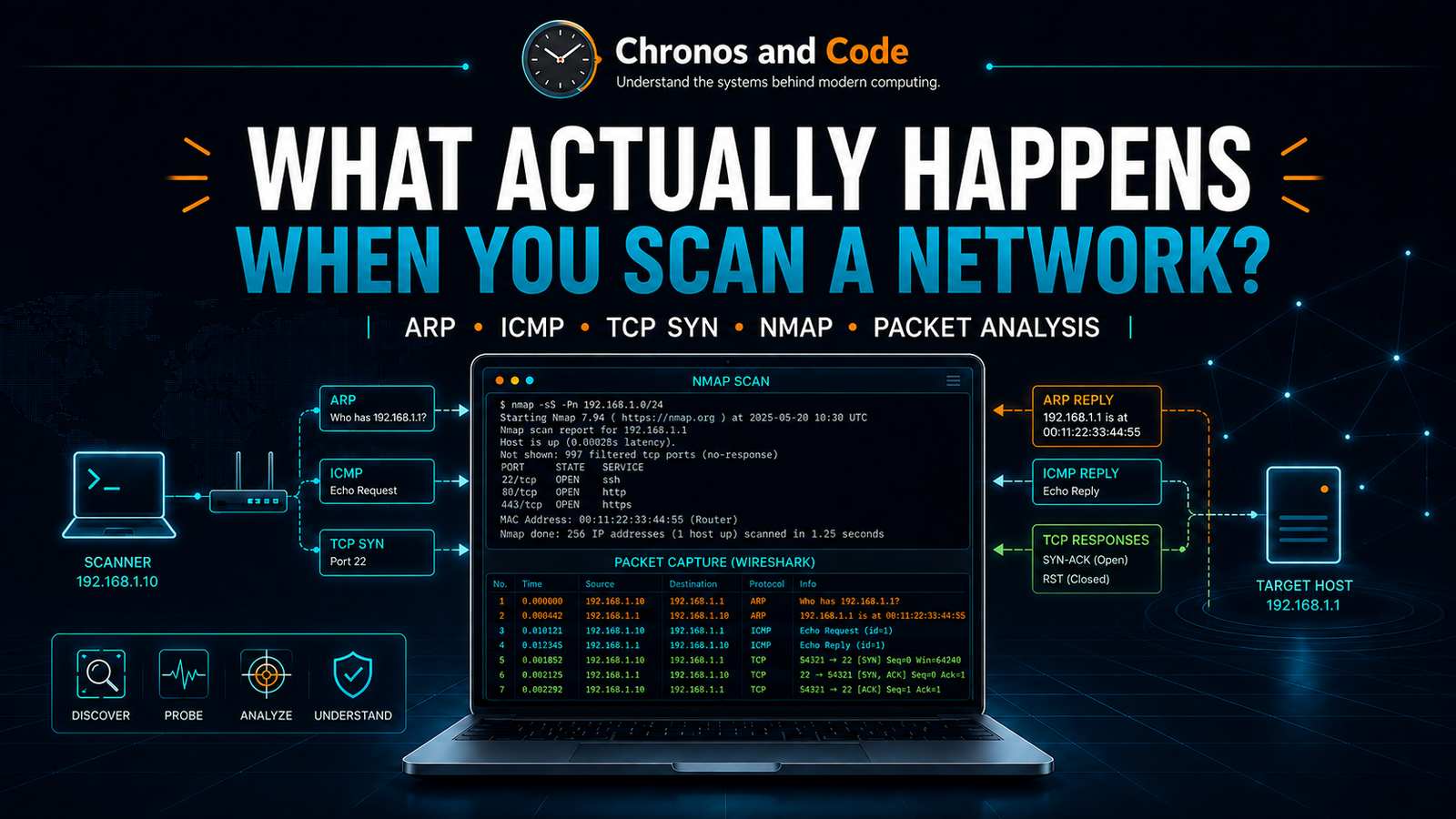
1. Introduction – A Network Scan Is More Than a List of Open Ports
Run Nmap against a system and the result can look deceptively simple:
PORT STATE SERVICE
8000/tcp open http-alt
At first glance, it appears that Nmap simply asked the target whether port 8000 was open and received an answer.
That is not what actually happened.
Underneath that single line of output, several networking mechanisms may already have been involved. The scanning machine may first need to determine whether the target exists. If both systems are on the same local network, it may need to resolve an IP address to a MAC address using ARP. It may use ICMP or other probes to test reachability. When checking TCP ports, it sends specially constructed packets and determines the port state from the way the target responds.
An open port, a closed port, and a filtered port therefore do not come from arbitrary labels inside Nmap. They are conclusions drawn from observable network behavior.
In this guide, we are going to follow that behavior packet by packet.
Rather than relying only on theory, we will use a private home-lab environment with Kali Linux as the scanning system and a MISP server as the target. We will capture the traffic in Wireshark and compare what happens during host discovery, ARP resolution, ICMP communication, TCP SYN scanning, open and closed ports, firewall filtering, and service-version detection.
The goal is not simply to learn Nmap commands. The goal is to understand what Nmap is observing on the network when it produces its results.
2. The Lab Environment
All testing in this article was performed inside an isolated virtual lab that I control.
The two systems used for the main experiments were:
Kali Linux
192.168.95.135/24
Scanner

MISP Server
192.168.95.131/24
Target
Both systems were connected to the same private host-only network:
192.168.95.0/24
Conceptually, the environment looked like this:
Host-Only Network
192.168.95.0/24
|
Virtual Switch
________|_____________
|                   |
Kali               MISP
192.168.95.135   192.168.95.131
Scanner              Target
Because both machines belong to the same subnet, they can communicate directly through the virtual network without placing the experiment onto the physical household LAN.
This matters because network scanning should only be performed against systems you own or have explicit authorization to test.
Responsible-use note: Everything demonstrated in this article was performed inside an isolated home lab that I control. Only scan systems and networks you own or are explicitly authorized to test. Unauthorized scanning may violate laws, organizational policies, acceptable-use rules, or service terms depending on the jurisdiction and environment.
Confirming the scanner configuration
On Kali, we first checked the interface configuration:
ip addr
The active interface was:
eth0
with the address:
192.168.95.135/24
The routing table confirmed that the private subnet was directly connected:
ip route
which showed:
192.168.95.0/24 dev eth0 proto kernel scope link src 192.168.95.135
We then tested connectivity to MISP:
ping -c 4 192.168.95.131
All four packets were returned successfully with 0% packet loss.
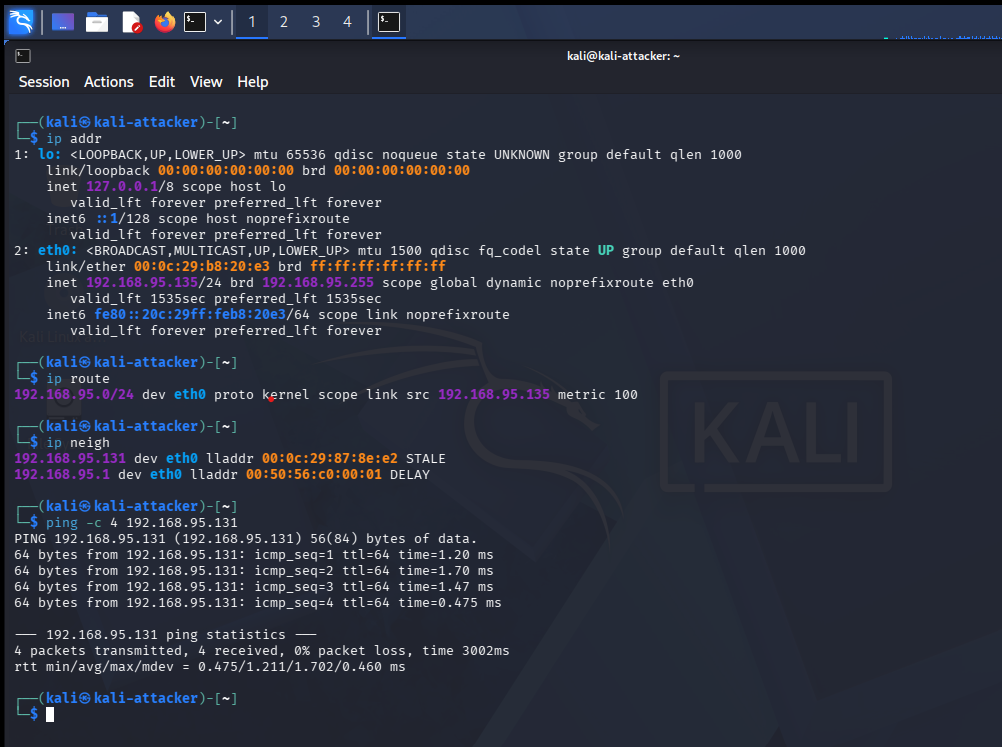
Figure 1. Kali Linux configured as the scanner at 192.168.95.135/24, successfully reaching MISP at 192.168.95.131 across the private host-only network.
At this point, we know the two machines can communicate.
But that result hides something important.
Before Kali can send traffic directly to 192.168.95.131 on the local Ethernet network, it needs to know where that IP address exists at Layer 2.
That is where ARP enters the process.
3. ARP – Finding the Machine Behind an IP Address
IP addresses operate at the network layer, but Ethernet frames are delivered using MAC addresses.
Kali knows that it wants to communicate with:
192.168.95.131
but on the local network it also needs the MAC address associated with that IP.
The Address Resolution Protocol, or ARP, solves this problem.
Conceptually:
Kali knows:
Target IP = 192.168.95.131
But initially needs:
Target MAC = ?
Kali sends an ARP request asking:
Who has 192.168.95.131?

Tell 192.168.95.135
Because Kali does not yet know which device owns that IP address, the request is sent as an Ethernet broadcast.
MISP then answers:
192.168.95.131 is at 00:0c:29:87:8e:e2
We captured this directly in Wireshark.
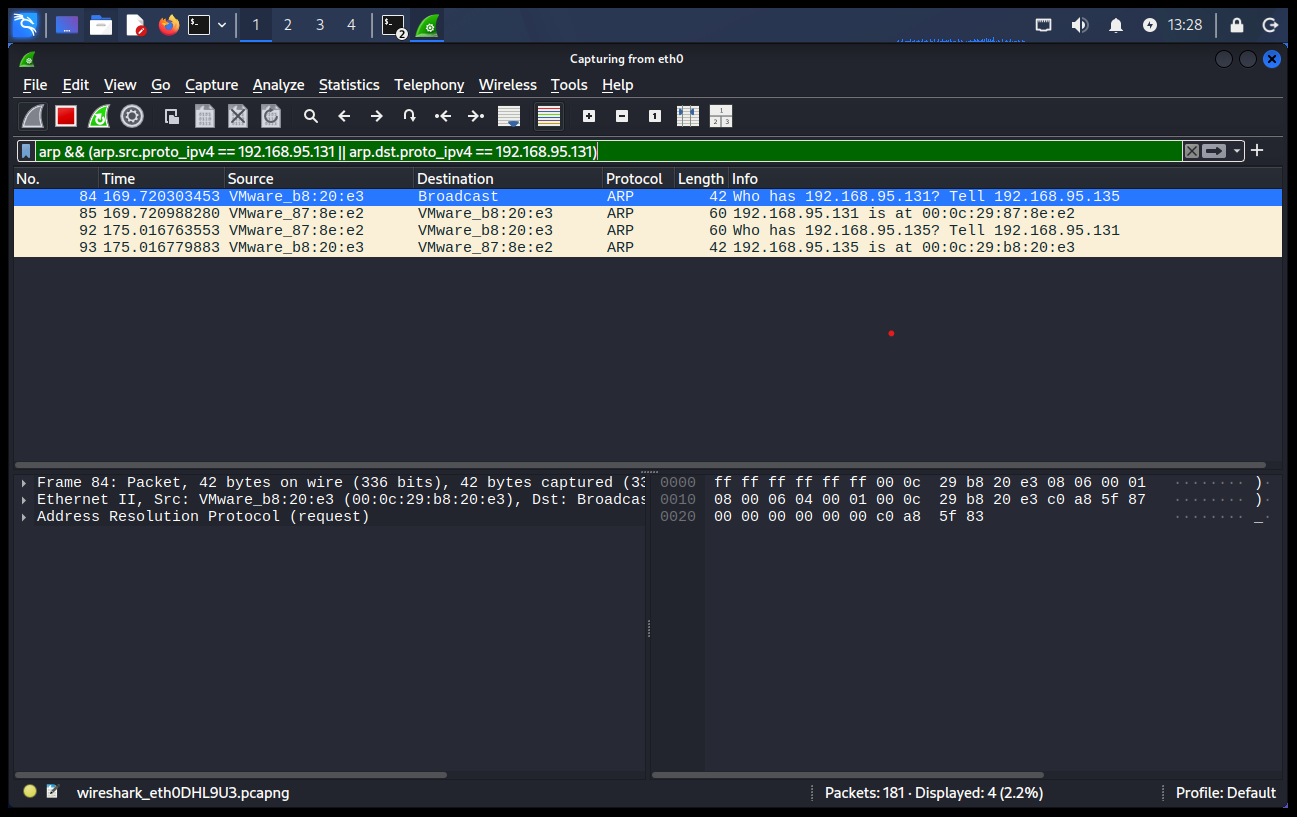
Figure 2. Wireshark capturing ARP resolution between Kali (192.168.95.135) and MISP (192.168.95.131) on the private host-only network.
The capture showed both sides of the exchange:
Kali → Broadcast

Who has 192.168.95.131? Tell 192.168.95.135

MISP → Kali

192.168.95.131 is at 00:0c:29:87:8e:e2
Kali can then store that mapping in its neighbor table.
Running:
ip neigh
showed:
192.168.95.131 dev eth0 lladdr 00:0c:29:87:8e:e2
This is an important distinction:
IP address
192.168.95.131

 ↓
ARP resolution

 ↓
MAC address
00:0c:29:87:8e:e2
ARP is therefore part of the foundation that makes local network communication possible.
And it becomes especially interesting when we begin using Nmap for host discovery.
4. ICMP – What Actually Happens During a Ping
Once Kali knows how to reach MISP on the local network, we can test IP-level communication using ICMP.
We ran:
ping -c 4 192.168.95.131
While the command was running, Wireshark captured the packets exchanged between the two systems.
The result followed a simple pattern:
Kali → MISP
ICMP Echo Request
MISP → Kali
ICMP Echo Reply
repeated four times.
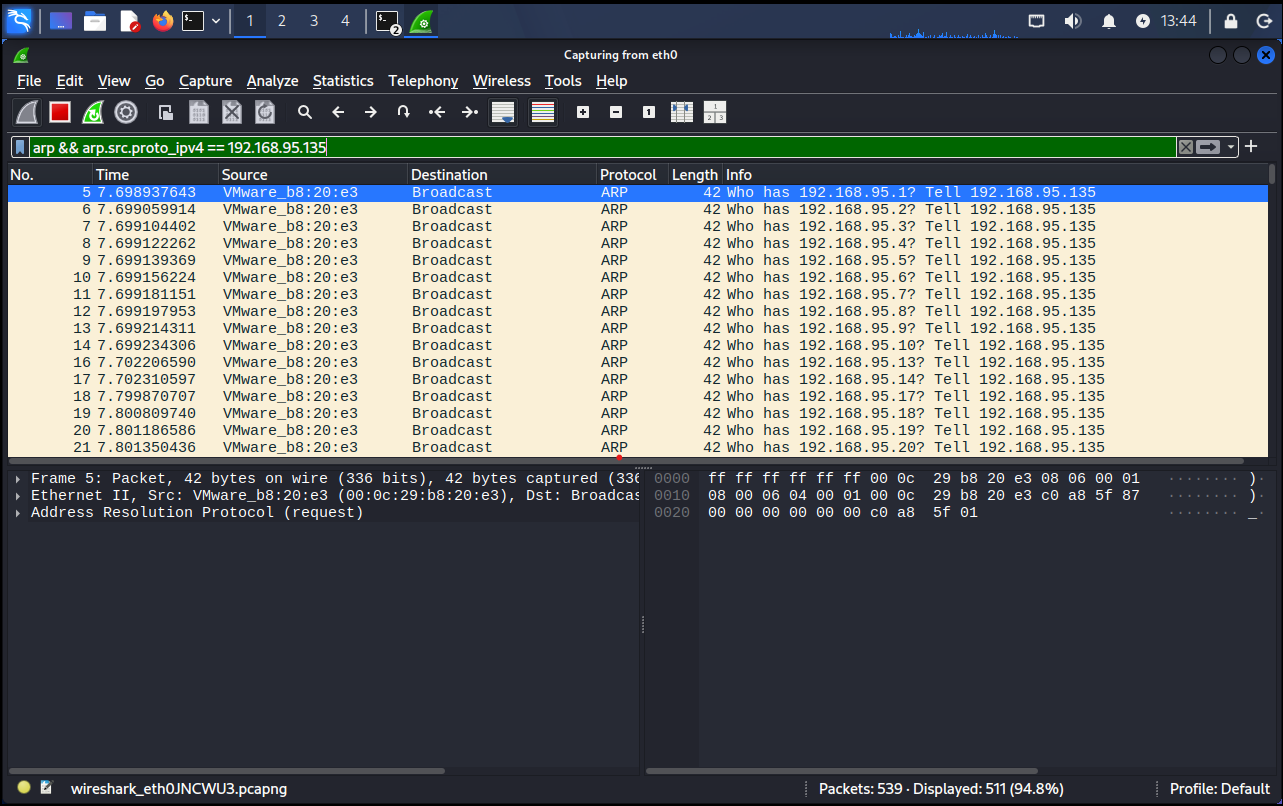
Figure 3. Wireshark capturing ICMP Echo Requests from Kali and Echo Replies from MISP across the private host-only network.
This gives us two different layers of evidence.
ARP answered:
Which MAC address owns 192.168.95.131?
ICMP then answered:
Can 192.168.95.131 receive an IP packet and respond?
The process can therefore be simplified as:
Target IP known
 ↓
ARP resolves MAC
 ↓
ICMP Echo Request
 ↓
Target receives packet
 ↓
ICMP Echo Reply
 ↓
Reachability confirmed
However, ping should not be treated as a perfect test for whether a host exists.
A firewall may block ICMP Echo Requests while allowing other traffic. A machine may therefore be online even when a normal ping receives no reply.
This becomes important when we look at how Nmap performs host discovery.
5. Nmap Host Discovery – Finding Systems Before Scanning Ports
Before examining ports, a scanner often first needs to determine which addresses correspond to live systems.
Our lab uses:
192.168.95.0/24
A /24 network contains 256 addresses in total.
To perform host discovery without carrying out a normal port scan, we ran:
sudo nmap -PR -sn 192.168.95.0/24
The options are important.
-sn tells Nmap to perform host discovery without proceeding into the normal port-scanning phase.
-PR explicitly requests ARP discovery for the local Ethernet network.
The scan found four active addresses:
192.168.95.1
192.168.95.131
192.168.95.254
192.168.95.135
and concluded:
Nmap done: 256 IP addresses (4 hosts up)
MISP appeared at:
192.168.95.131
while Kali itself appeared at:
192.168.95.135
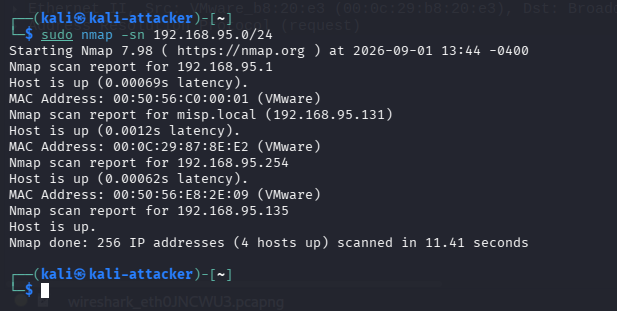
Figure 4. Nmap host discovery identifying four active addresses on the private 192.168.95.0/24 lab network.
But the Nmap output only shows the conclusion.
Wireshark showed us how that conclusion was being reached.
During the scan, Kali generated ARP requests across the subnet:
Who has 192.168.95.1? Tell 192.168.95.135
Who has 192.168.95.2? Tell 192.168.95.135
Who has 192.168.95.3? Tell 192.168.95.135
Who has 192.168.95.4? Tell 192.168.95.135
...
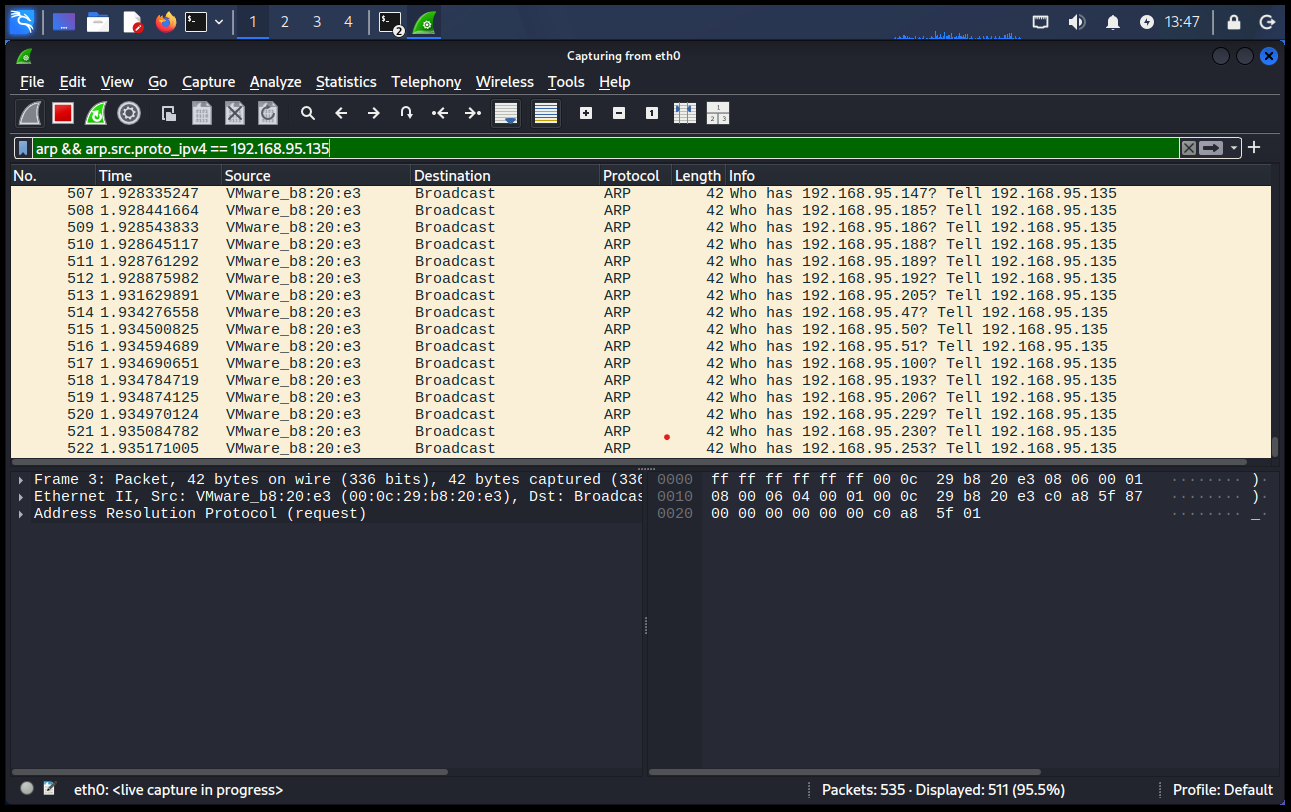
Figure 5. Wireshark showing Kali broadcasting ARP requests across the 192.168.95.0/24 subnet during Nmap host discovery.
This demonstrates an important point:
“Ping scan” or host discovery does not necessarily mean Nmap is simply sending ordinary ICMP ping packets.
On a directly connected Ethernet network, ARP is particularly useful because a device that wants to communicate locally must participate in Layer-2 address resolution.
Once the scanner has identified a live host, it can begin asking a different question:
What network services are listening on it?
If you want a deeper explanation of what an IP address actually reveals and what it does not, see What Can Someone Actually Do With Your IP Address?
6. What a Port Actually Represents
A port is not a physical socket on the computer.
It is a logical endpoint used by transport protocols such as TCP and UDP to distinguish between applications communicating through the same IP address.
A simplified relationship looks like this:
IP address
192.168.95.131
 |
 ├── TCP 22 → potentially SSH
 ├── TCP 80 → potentially HTTP
 ├── TCP 443 → potentially HTTPS
 └── TCP 8000 → potentially another application
The IP address identifies the network interface or host destination.
The port helps identify the application endpoint.
To demonstrate this directly, we created a temporary service on MISP.
7. Creating a Real Open Port
On MISP, we started Python’s built-in HTTP server:
python3 -m http.server 8000 --bind 192.168.95.131
The server reported:
Serving HTTP on 192.168.95.131 port 8000
A request from Kali reached the server successfully, and MISP logged:
"GET / HTTP/1.1" 200

Figure 6. A temporary Python HTTP server listening on MISP at 192.168.95.131:8000 and responding to a request from Kali.
We then scanned only that port from Kali:
nmap -p 8000 192.168.95.131
Nmap returned:
PORT STATE SERVICE
8000/tcp open http-alt
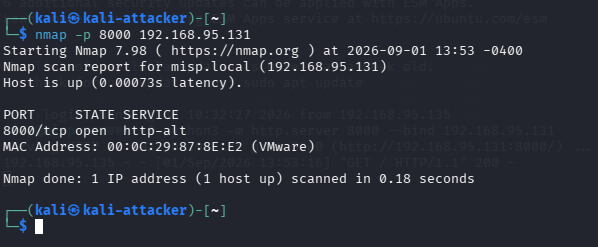
Figure 7. Nmap identifying TCP port 8000 as open while the temporary HTTP service is running on MISP.
This is the key relationship:
Application starts listening
 ↓
TCP port 8000 accepts connections
 ↓
Scanner sends probe
 ↓
Target responds
 ↓
Nmap reports OPEN
But what exactly did MISP send back that allowed Nmap to reach that conclusion?
For that, we need to examine TCP.
8. The TCP Three-Way Handshake
A normal TCP connection begins with a three-way handshake:
Client Server
SYN
---------------------------->
 SYN, ACK
<----------------------------
ACK
---------------------------->
Connection established
The SYN packet asks to begin a TCP connection.
The SYN/ACK response indicates that the destination is willing to establish that connection.
The final ACK completes the handshake.
When scanning with a TCP SYN scan, however, Nmap can learn whether a port is open without completing the entire connection.
9. TCP SYN Scanning – How Nmap Detects an Open Port
With the HTTP server still listening on MISP, we ran:
sudo nmap -sS -p 8000 192.168.95.131
Nmap reported:
8000/tcp open
At the same time, Wireshark captured exactly three TCP packets:
Kali → MISP
SYN
MISP → Kali
SYN, ACK
Kali → MISP
RST
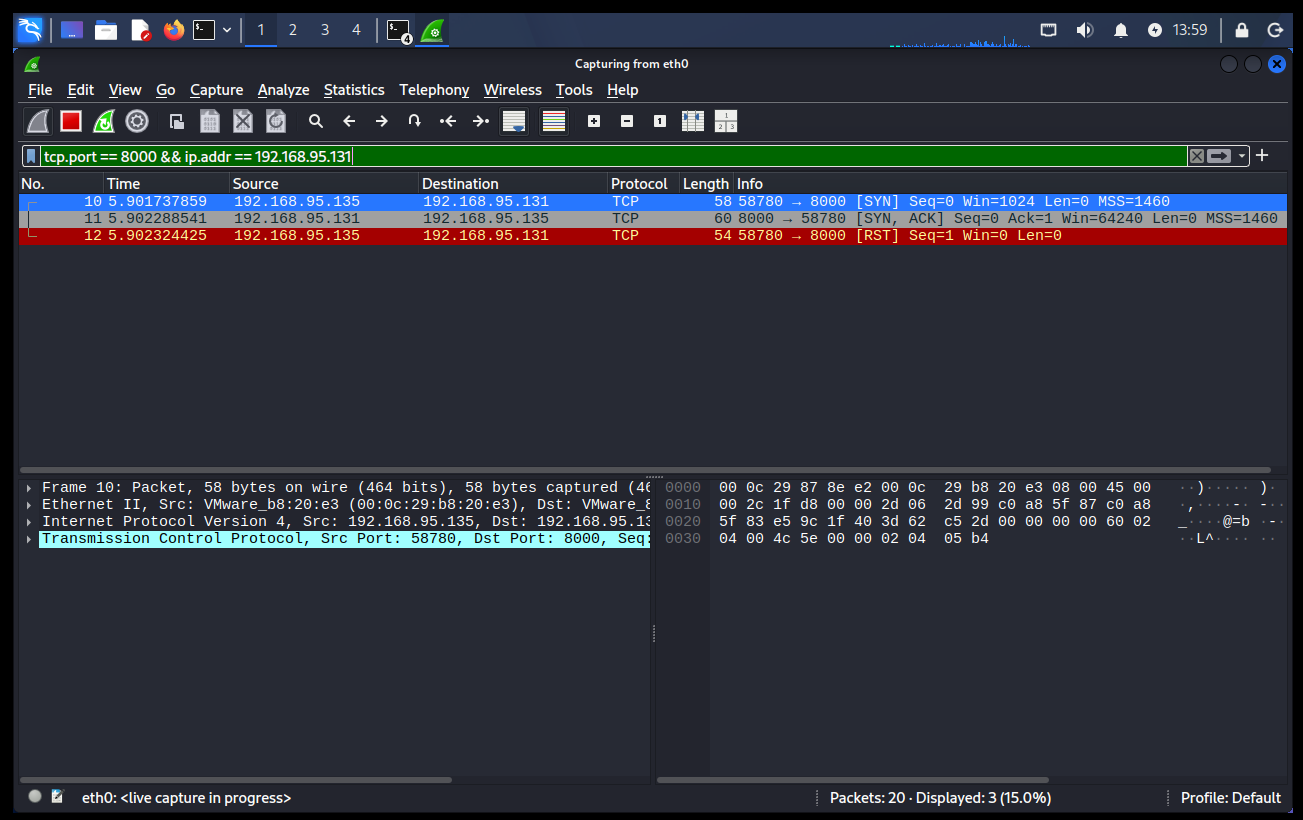
Figure 8. Wireshark capturing an Nmap TCP SYN scan: Kali sends SYN, MISP responds with SYN/ACK, and Kali sends RST after confirming port 8000 is open.
The target’s SYN/ACK is the critical piece of information.
It tells the scanner:
Something is listening on TCP port 8000
and is willing to establish a connection.
At that point, Nmap already has the answer it needs.
Instead of completing the connection with the final ACK, the scanner sends an RST to reset it.
The sequence therefore becomes:
SYN
 ↓
SYN/ACK
 ↓
Port confirmed OPEN
 ↓
RST
This is why a SYN scan is often described as a half-open scan.
10. What Does a Closed Port Look Like?
Next, we stopped the Python HTTP server.
No application was now listening on TCP port 8000.
We repeated exactly the same scan:
nmap -p 8000 192.168.95.131
This time Nmap reported:
PORT STATE SERVICE
8000/tcp closed http-alt
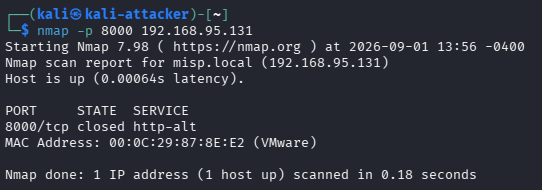
Figure 9. Nmap reporting TCP port 8000 as closed after the temporary HTTP service was stopped while the MISP host remained reachable.
This distinction is extremely important.
closed does not mean:
The computer is offline.
The scan still reported:
Host is up
Instead, closed means that the host responded, but no application was accepting TCP connections on that destination port.
Wireshark makes this even clearer.
The closed-port scan produced:
Kali → MISP
SYN
MISP → Kali
RST, ACK
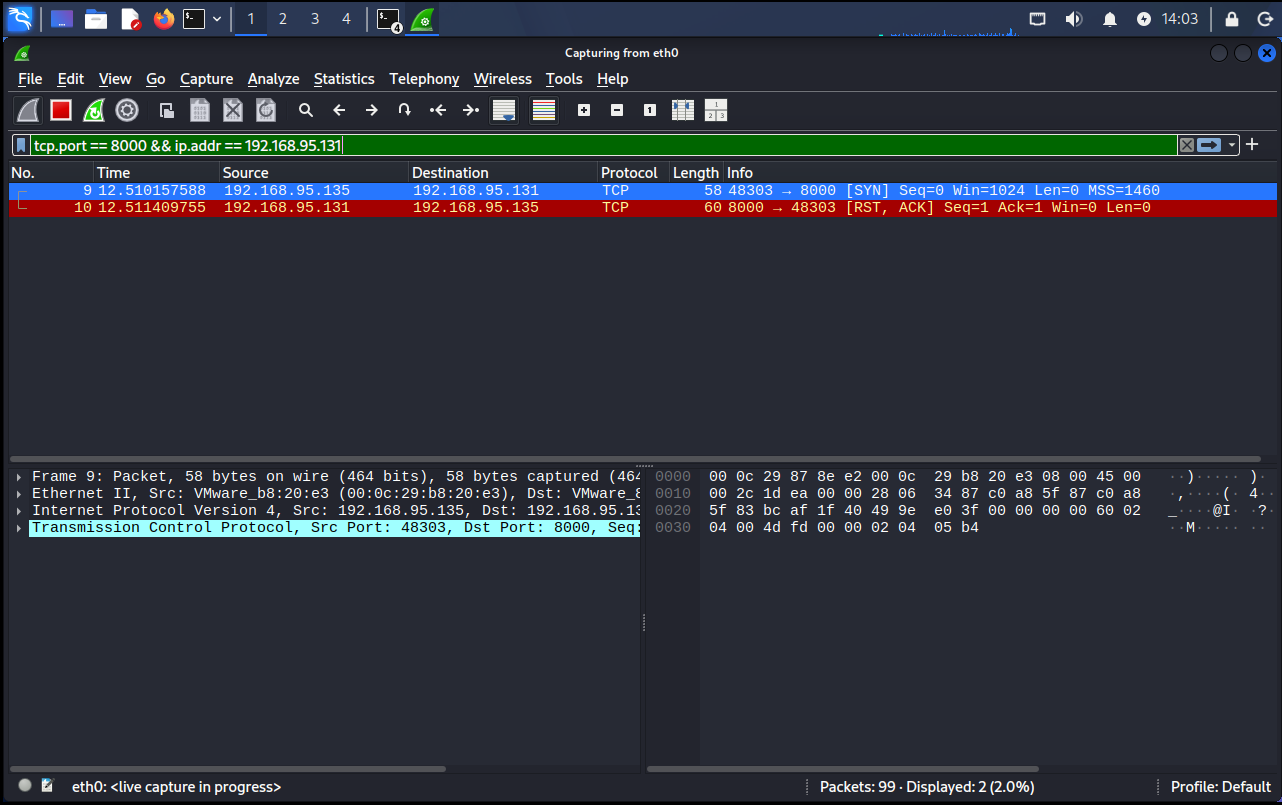
Figure 10. Wireshark showing MISP responding to a SYN probe with RST/ACK because no application is listening on TCP port 8000.
Now we can directly compare the responses:
OPEN PORT
Kali → SYN
MISP → SYN/ACK
CLOSED PORT
Kali → SYN
MISP → RST/ACK
Nmap does not need the target to explicitly send the word open or closed.
It interprets the TCP response.
11. What Does “Filtered” Mean?
There is a third state that often causes confusion:
filtered
To demonstrate it, the HTTP service was started again on port 8000, but a temporary firewall rule was configured to silently drop TCP traffic to that port from Kali.
The scan was repeated:
sudo nmap -sS -p 8000 192.168.95.131
Nmap now reported:
PORT STATE SERVICE
8000/tcp filtered http-alt
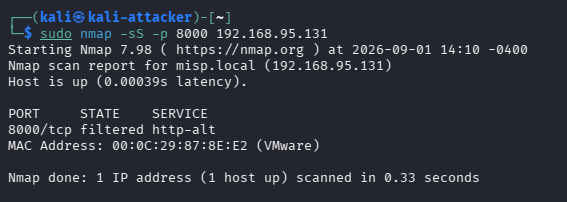
Figure 11. Nmap reporting TCP port 8000 as filtered after firewall rules silently dropped the scanner’s probes.
Wireshark showed the crucial difference.
Kali sent:
SYN
and later retried:
SYN
But MISP sent no response back to Kali.
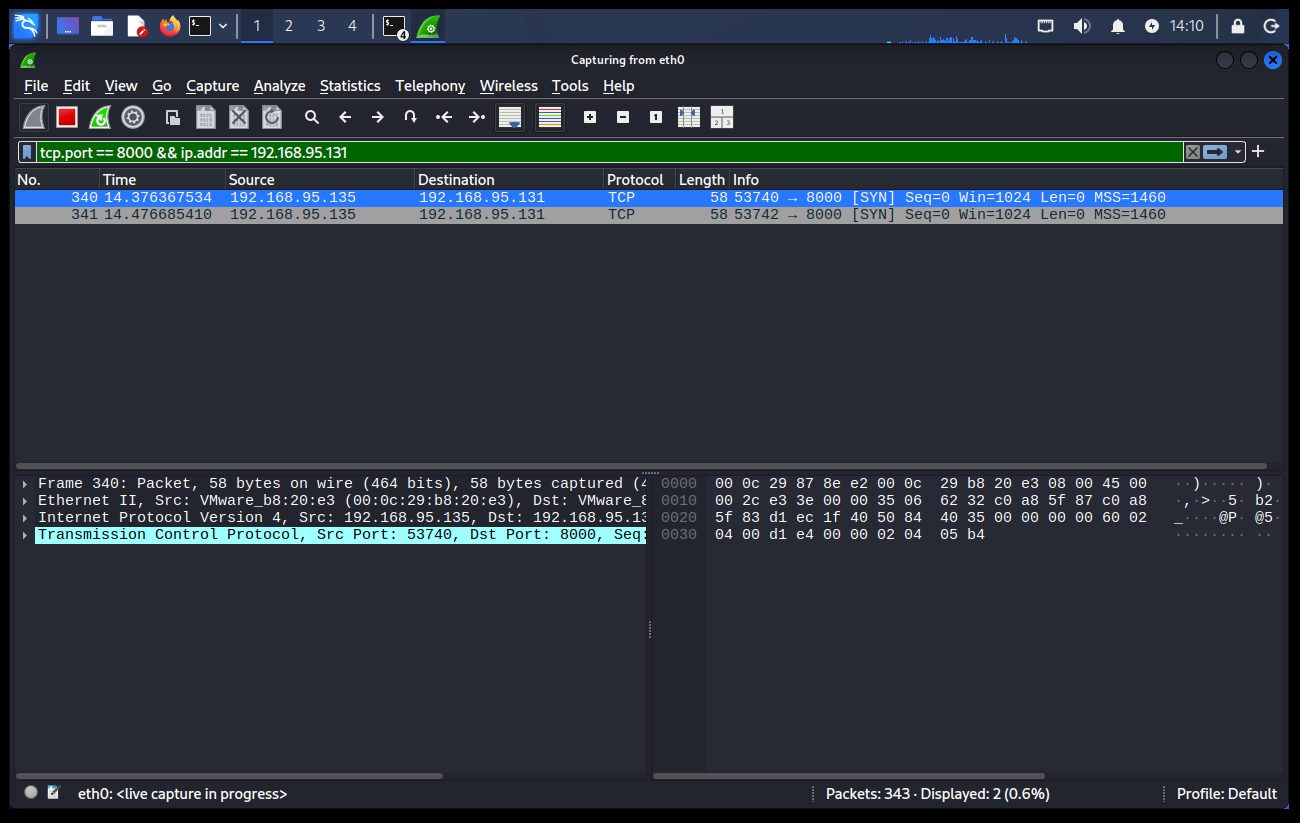
Figure 12. Wireshark showing repeated SYN probes from Kali with no corresponding TCP response while port 8000 is being filtered.
We now have three completely different packet patterns:
OPEN
SYN →
 ← SYN/ACK
RST →
CLOSED
SYN →
 ← RST/ACK
FILTERED
SYN →
(no response)
SYN → retry
(no response)
This is one of the most useful ways to understand Nmap states.
Open means the target responded in a way consistent with a listening service.
Closed means the host responded, but rejected the connection because no service was listening.
Filtered means Nmap could not obtain enough information to determine whether the port was open or closed because something, such as a firewall, prevented the expected response from reaching the scanner.
That last distinction matters.
Filtered does not automatically mean:
There is definitely a firewall.
It means the scanner cannot reliably determine the underlying port state from the responses it received.
12. Service Detection – Going Beyond “Open”
Knowing that a TCP port is open is useful, but it does not necessarily tell us what application is running behind it.
Port numbers provide hints, but applications are not required to use their conventional ports.
To investigate further, Nmap supports service/version detection.
With the Python HTTP server running again, we executed:
nmap -sV -p 8000 192.168.95.131
The result was:
PORT STATE SERVICE VERSION
8000/tcp open http SimpleHTTPServer 0.6 (Python 3.12.3)
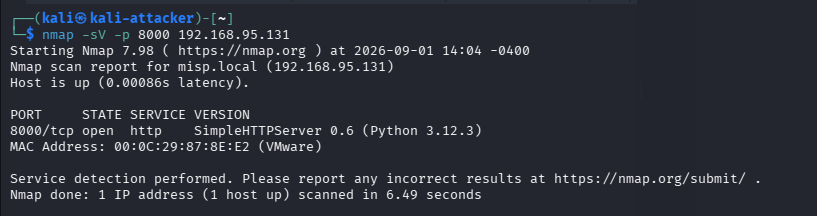
Figure 13. Nmap service-version detection identifying the temporary Python HTTP server running on TCP port 8000.
This is substantially more information than:
8000/tcp open
Nmap determined that the service appeared to be:
HTTP
SimpleHTTPServer 0.6
Python 3.12.3
To obtain this information, service detection interacts with the application rather than relying only on the initial SYN/SYN-ACK response.
Our Wireshark capture showed considerably more TCP and HTTP traffic, including HTTP requests and 200 OK responses.
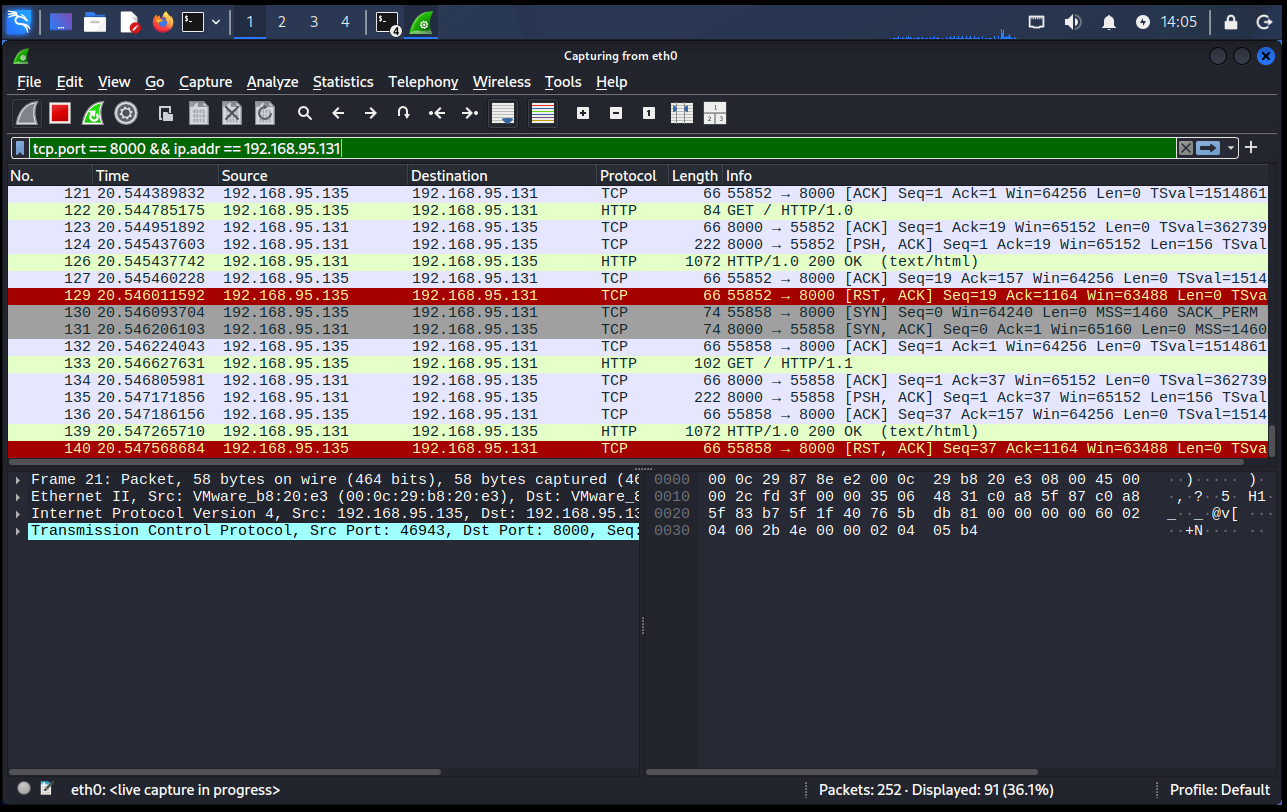
Figure 14. Wireshark capturing the additional TCP and HTTP exchanges generated while Nmap performs service-version detection against port 8000.
This highlights an important difference:
Port scan
→ Is something listening?
Service detection
→ What appears to be listening?
13. An Open Port Is Not Automatically a Vulnerability
This distinction is important enough to state directly:
“An open port does not automatically mean a system is vulnerable.”
An open port tells us that an application is reachable over that network path.
For example:
8000/tcp open
means something accepted TCP communication on port 8000.
Determining whether that service is actually vulnerable requires additional information such as its software, version, configuration, authentication controls, patches, exposed functionality, and network restrictions.
Think of the progression like this:
Host discovered
 ↓
Port discovered
 ↓
Service identified
 ↓
Configuration/version understood
 ↓
Security assessment
Network scanning is therefore usually part of reconnaissance or asset discovery, not proof that exploitation is possible.
14. Why ARP, ICMP, and TCP Tell Us Different Things
Our experiments used several protocols, but each answered a different question.
ARP
Who owns this local IP address?
ICMP
Can this system exchange IP-level diagnostic traffic?
TCP SYN
Is a TCP service accepting connections on this port?
Service Detection
What application appears to be behind the open port?
This is why scanning is better understood as a sequence of observations than as one single action.
A scanner may begin with:
192.168.95.131
and gradually learn:
192.168.95.131 exists
 ↓
MAC address discovered
 ↓
Host responds
 ↓
TCP 8000 responds
 ↓
Port is open
 ↓
HTTP detected
 ↓
SimpleHTTPServer identified
Each conclusion comes from a different kind of network evidence.
15. Why Local Network Scanning Is Different
Our experiment occurred on a directly connected host-only subnet.
That matters.
Kali and MISP both belonged to:
192.168.95.0/24
so Kali could use ARP directly.
ARP does not normally cross routers.
If the destination were on another routed network, the Layer-2 behavior would be different. Kali would resolve the MAC address of its next-hop gateway rather than broadcasting an ARP request across the remote network.
Conceptually:
Same subnet:
Kali
 |
 | ARP for target
 v
MISP
Different subnet:
Kali
 |
 | ARP for gateway
 v
Router
 |
 | routed traffic
 v
Remote target
This is why understanding the underlying network architecture is important when interpreting scan behavior.
The same Nmap command can result in different discovery mechanisms depending on where the target exists relative to the scanner.
16. What Wireshark Adds That Nmap Does Not
Nmap gives us conclusions:
Host is up
8000/tcp open
8000/tcp closed
8000/tcp filtered
Wireshark gives us the evidence behind those conclusions.
With packet capture, we were able to observe:
ARP Request
ARP Reply
ICMP Echo Request
ICMP Echo Reply
TCP SYN
TCP SYN/ACK
TCP RST/ACK
TCP retries
HTTP requests
HTTP responses
That is why combining Nmap and Wireshark is so useful when learning network security.
Nmap tells you what the scanner believes.
Wireshark helps you understand why it believes it.
17. Common Misunderstandings About Network Scanning
Several assumptions become easier to correct once the packets are visible.
“If ping fails, the host is offline.”
Not necessarily. ICMP may be filtered while other protocols remain reachable.
“An open port means the system is vulnerable.”
No. It means an application is accepting network connections on that port.
“A closed port means the host is offline.”
No. In our experiment, MISP remained reachable and actively returned RST/ACK when port 8000 was closed.
“Filtered means the port is closed.”
Not necessarily. Filtered means the scanner could not determine the actual state because expected responses were blocked or otherwise unavailable.
“Nmap magically knows what is running.”
It does not. Nmap sends probes, observes responses, applies protocol knowledge and fingerprints, and then reports its interpretation.
18. Putting the Entire Scan Together
We can now follow the process from beginning to end.
 KALI SCANNER
 192.168.95.135
 |
 |
 Target IP selected
 192.168.95.131
 |
 v
 ARP Discovery
 |
 "Who has 192.168.95.131?"
 |
 v
 Target located
 |
 v
 Host Discovery / ICMP
 |
 v
 TCP SYN Probe
 |
 ___________|____________
 | | |
 v v v
 SYN/ACK RST/ACK No Response
 | | |
 v v v
 OPEN CLOSED FILTERED
 |
 v
 Service Detection
 |
 v
 HTTP / SimpleHTTPServer
 |
 v
 Nmap Result
What originally looked like a simple line:
8000/tcp open
is actually the end result of observable networking behavior.
Conclusion
Network scanning is not magic, and Nmap does not have some hidden way of seeing directly inside another computer.
It sends network traffic.
It observes how systems respond.
It interprets those responses according to the behavior of protocols such as ARP, ICMP, and TCP.
In our private lab, we were able to watch that process happen directly.
All of these experiments were performed against systems inside my own isolated lab. The same techniques should only be used against infrastructure you own or have explicit authorization to assess.
These same networking foundations are used in the Threat-Intelligence-Driven Detection Lab.
ARP translated the target’s IP address into a local MAC address.
ICMP demonstrated basic communication between Kali and MISP.
Nmap’s host discovery used ARP requests to identify active systems on the local subnet.
A TCP SYN scan showed that an open port responded with SYN/ACK.
Stopping the service changed that response to RST/ACK and caused Nmap to report the port as closed.
Adding a firewall rule caused the probes to disappear without a response, producing a filtered result.
Finally, service detection moved beyond the port state and identified the Python HTTP service running behind TCP port 8000.
The entire process can be reduced to one principle:
“A network scanner learns about a system by generating traffic and interpreting what comes back or, sometimes, what does not come back at all.”
Once you understand that, Nmap output becomes much more meaningful.
Instead of simply seeing:
open
closed
filtered
you can begin visualizing the packets that produced those results.
And that is the point where network scanning stops being a command you memorize and becomes networking behavior you actually understand.
If this piece gave you something to think about, you can support my writing here ☕